How the channels fit together
Phone, e-mail, WhatsApp and the property portals come together in one inbox and one lead per applicant and flat.
Applicants get in touch in different ways. Nimmi brings these ways together so that you see one lead per person and flat.
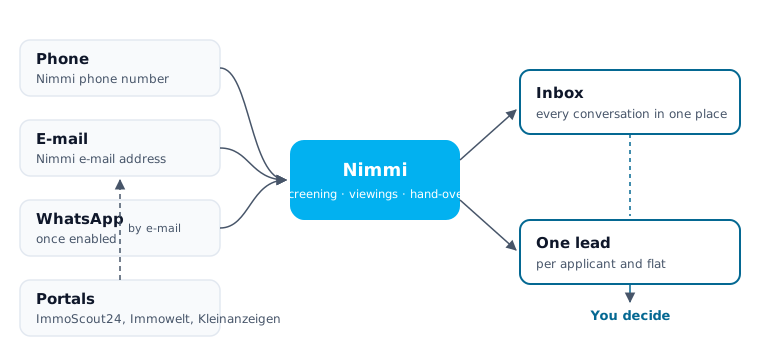
The channels
| Channel | How applicants reach it | What Nimmi does |
|---|---|---|
| Phone | Through your account's Nimmi phone number | Nimmi holds the conversation, asks for consent and asks the screening questions |
| Through the Nimmi e-mail address you put in your portal adverts | Nimmi answers according to your settings | |
| Through Nimmi's WhatsApp number, if WhatsApp is enabled for your account | Nimmi replies in the chat. She also answers incoming WhatsApp calls if you switch on Applicants can call you on WhatsApp — Nimmi answers and your plan includes calls | |
| Portals | ImmoScout24, Immowelt and Kleinanzeigen forward enquiries by e-mail | The enquiry reaches Nimmi like an e-mail |
SMS and web chat are not conversation channels. SMS is only used to send the code that confirms a phone number, for example at sign-up.
One lead per applicant and flat
- Every person gets one lead per flat, with one open conversation per channel.
- If the same person gets in touch through a second channel, Nimmi joins the contacts into one lead only on proof – a verified contact, that is, a contact the person has shown they control.
- A WhatsApp number named in an e-mail, for example, is only linked to the e-mail lead once the person confirms it by replying YES from that number. Until then the number is not verified, and a phone number alone is never verified.
One inbox for everything
The Inbox shows the conversations from every channel. WhatsApp conversations carry a green chat icon; calls appear as cards in the conversation.
From there you can reply yourself. There is no separate take-over button: if you reply to an e-mail yourself, you take the conversation over and Nimmi stays out of it. With Give back to Nimmi you hand it back. How this works is described in Nimmi's behaviour and The inbox.
When Nimmi writes and when she stays quiet
- Approval: per channel you decide whether Nimmi sends automatically or whether you approve replies first.
- Quiet hours: e-mail and WhatsApp share one quiet-hours setting. It is off by default.
- Opt-out: if a person writes STOP on WhatsApp or unsubscribes by e-mail, Nimmi no longer writes to them that way.
Next
Last updated: