15-minute quick start
From a new account to the first enquiry Nimmi answers for you – step by step.
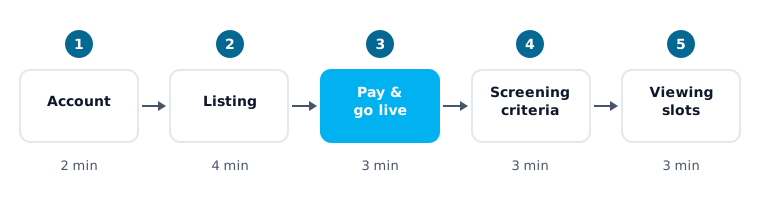
This page takes you through the set-up in about 15 minutes. Every step links to a detail page if you want to know more. The times are rough guides for a single listing. The steps describe the path for private landlords; property managers set up their portfolio in the Set up Nimmi area (see Your first listing).
Before you start
Have these ready:
- an e-mail address and a mobile phone for the SMS confirmation code,
- the key facts of the flat (rooms, living area, address, cold and warm rent, energy certificate), a short description and at least one photo,
- an idea of the household that fits (number of people, pets, move-in date, income),
- two or three time windows in which you can offer viewings.
The steps
Create your account (2 minutes)
Sign up with e-mail and password, with Google or with Facebook, and confirm your phone number with an SMS code. Details: Create your account.
Add your listing (4 minutes)
In the first set-up phase, Import your apartment, you either create a new listing with No listing yet? Create one with Nimmi or paste the link of an existing portal advert. To publish, Nimmi needs the required details, a description and at least one photo. Details: Your first listing.
Pay and go live (3 minutes)
Choose your package and pay. Nimmi's e-mail address – and her phone number, if your package includes calls – are then created for your account, and a complete listing becomes active. Details: Go live.
Set the screening criteria (3 minutes)
After payment the phase Customize your Nimmi starts with Screening Setup. Decide which household fits: people, pets, move-in date, minimum income, WBS and occupation groups. Nimmi asks about these points in the conversation. Details: Screening questions.
Add viewing slots (3 minutes)
On the Viewing Availability page you create concrete slots. Nimmi offers suitable applicants only these slots. In the last phase, Take Nimmi live, you check the listing and put Nimmi's contact on your advert. Details: Viewing availability.
You can leave the set-up after payment and continue later; your listing goes live regardless.
Afterwards: route enquiries to Nimmi
Nimmi can only answer enquiries that reach her. Depending on how your listing is published, enter Nimmi's phone number and e-mail address as the contact on your portal adverts:
- Connect e-mail
- Phone number
- Connect WhatsApp (plan feature)
What next?
- What Nimmi does in a conversation and when she hands over to you: Nimmi's behaviour
- All settings at a glance: Account and settings
- Questions and problems: FAQ and Troubleshooting
Last updated: