Letting
From the viewing to the tenancy agreement – collecting documents, choosing a tenant, preparing the contract and recording the tenancy.
After the viewing, Nimmi can support you until the tenancy starts: she asks whether applicants are still interested, collects documents, delivers your offer and prepares the contract details. You always make the decisions.
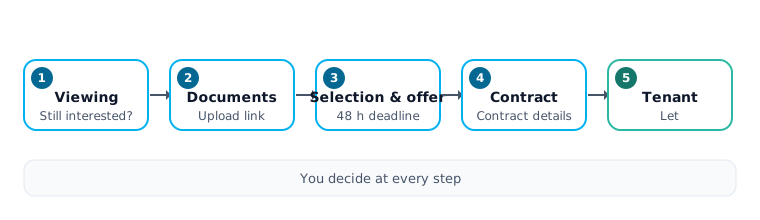
The four modules
Under Settings → Follow-ups, section After the viewing, there are four optional modules. Each is off until you switch it on; off means Nimmi works exactly as before.
| Module | What it does |
|---|---|
| Follow-up after the viewing | Nimmi asks by e-mail or WhatsApp whether the applicant is still interested and tells you who is. |
| Document collection | Nimmi collects the documents of interested applicants through a personal upload page. |
| Tenant selection | You compare the interested applicants and make an offer. |
| Contract & tenancy | Ask for the contract details, signing appointment, mark as tenant. |
Document collection needs Follow-up after the viewing. When you switch it on, the interface asks Switch both on?. You can change the setting per listing on the listing page. Under Messages at each step you also decide whether Nimmi should Send automatically or whether you get a draft to approve first (Draft first).
Applicant statuses
Along the way these statuses appear: Viewing completed, Documents requested, Documents complete, Offer pending, Backup, Contract in preparation, Tenant, Withdrew before move-in and Tenancy ended.
Document collection
As soon as an applicant says they are interested after the viewing, Nimmi sends your listing's document list with a personal Upload link.
- Which documents are requested depends on your listing's list and the applicant's type of employment. A residence permit is never requested automatically.
- The link needs no login and is valid for 30 days.
- PDF, JPG, PNG and Word files (.docx only, not the older .doc) up to 10 MB are accepted. Every file is scanned for viruses.
- Optionally the upload page shows a voluntary Tenant self-disclosure (for example current address, employer, income band, people in the household, pets, no rent arrears). Protected characteristics are not asked for.
Nimmi keeps track of which documents are missing, received or rejected and notices when everything looks complete. Nothing is ever confirmed automatically – confirming the documents stays your decision.
You do this in the lead panel and in the inbox under Details, in the Documents card below Other Applications: confirm the documents (Confirm documents), reject a single document (Reject), assign a file (Assign a file …) or create a new upload link (Create new link).
Tenant selection
On the listing page, Tenant selection shows the interested applicants side by side, in the order they enquired. You see facts only (Enquired on, Status, Answers, Attended the viewing, Documents, Offer, Backup, Your note). Nimmi does not score or rank.
Make an offer
Click Make offer for the chosen person, then Send offer. The person learns that they have been selected. Everyone else who is interested becomes a Backup and hears nothing negative.
Wait for the deadline
By default the person has 48 hours; you can choose 12 to 336 hours. Extend deadline gives more time. At half the deadline the person gets a reminder, but no earlier than 24 hours before the end.
Receive the answer
The person answers on their personal offer page with Yes, I'll take the flat or No, thank you, or simply in the chat.
There is only one open offer per listing. Reorder the backups with Move up and Move down. If an offer expires or is declined, the next backup is pre-selected; you decide whether they get the offer. Backups are never contacted automatically.
Contract and tenancy
When a person accepts your offer, Nimmi tells them that you are preparing the tenancy agreement and sends a personal link to the form Your details for the tenancy agreement. The link is valid for 30 days. It asks for full names, date of birth per adult, current address and the agreed start date (up to six adults). No bank details are asked for.
- Signing appointment: Nimmi offers times from your availability. The appointment does not count as a viewing and appears in the calendar as Contract signing; there is a reminder 24 hours before.
The card Contract & tenancy in the lead panel and in the inbox under Details holds the actions: start the contract step yourself (Prepare contract), Mark as tenant, Undo, and record Withdrew before move-in or Tenancy ended. To take a flat off the portals without marking a tenant, pause or delete the listing, see Listings and portals.
Who may decide
These are letting decisions:
- Documents: confirming an applicant's documents or rejecting a document.
- Tenant selection: making an offer, moving backups up or down, extending the deadline and closing all backups.
- Contract and tenancy: preparing the contract, marking the tenant, undoing that, and recording a withdrawal before move-in or the end of a tenancy.
- Status changes after the viewing: setting a lead to Tenant, or declining or moving a lead that is already in a stage after the viewing.
Not letting decisions are Came / Didn't come, recording interest, booking, cancelling and moving viewings, declining an applicant before the viewing, notes and cancelling a signing appointment.
In a team, members with the role Admin or Write may make letting decisions, members with Read may not. See Letting decisions and Organisation and team.
Related pages
Last updated: